

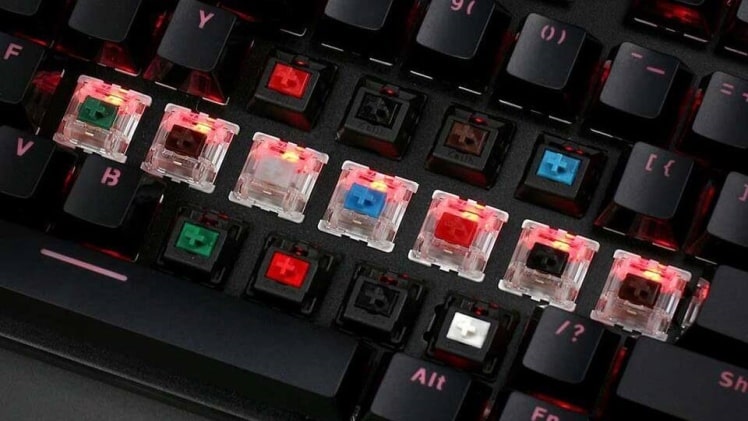
Mechanical keyboards are popular among gamers, programmers, and typists for their durability, tactile feedback, and customizable features. The switches are the heart of mechanical keyboards and determine the typing experience. This article will explore how mechanical keyboard switches work and the different types available.
What are mechanical keyboard switches?
Unlike the rubber dome switches in traditional keyboards, mechanical switches use individual mechanical components to register each keystroke. These components typically comprise a plastic stem, a spring, and a metal contact. When you press a key on a mechanical keyboard, the stem presses against the spring, compressing it until the metal contact hits a circuit board, registering the keystroke.
The advantage of mechanical switches is that each keystroke is independent and does not rely on the pressure exerted on surrounding keys. A mechanical keyboard can offer a more tactile and accurate typing experience. Additionally, mechanical switches have a longer lifespan and can last up to 50 million keystrokes compared to a rubber dome keyboard which typically lasts between 5-10 million.
Anatomy of a mechanical keyboard switch
To understand how mechanical keyboard switches work, let’s look at the different parts that make a switch.
-
Stem
The stem is the central component of the switch that connects the keycap to the switch. It has a variety of shapes and sizes, depending on the type of switch. The stem is designed to guide the keycap to the correct position and to align the keycap with the switch.
-
Spring
The spring is responsible for providing the switch’s resistance and tactile feedback. It is usually made of metal and has different weights, depending on the switch type. The spring’s weight determines the force required to activate the switch, and heavier springs require more force to actuate.
-
Metal contact
The metal contact is a small piece that sits at the bottom of the switch. When you press a key, the stem pushes against the spring, pushing the metal contact into a circuit board. The contact completes a circuit, registering the keystroke.
-
Housing
The housing is the outer shell of the switch, which holds all the other components together. It also provides stability to the switch and ensures that the stem, spring, and contact are aligned correctly. The housing is usually made of plastic and can have different shapes and colours, depending on the switch type.
Types of mechanical keyboard switches
There are many different mechanical keyboard switches, each with unique characteristics that appeal to different users. Cherry MX, Gateron, Kailh, and Alps are the most common switch types.
Cherry MX switches
Cherry MX switches are the most popular and widely used mechanical keyboard switches. Cherry Corporation introduced them in the 1980s, and has since become the industry standard for mechanical keyboards. Cherry MX switches have a stem that slides vertically up and down, making them relatively simple to manufacture.
There are several Cherry MX switches, each with a different colour code that indicates the switch’s properties. The most popular types of Cherry MX switches are:
- Cherry MX Blue: Blue switches are tactile and clicky, providing satisfying feedback and an audible click sound. They require 50g of force to actuate and have a total travel distance of 4mm.
- Cherry MX Brown: Brown switches are tactile but not clicky, providing more subtle feedback. They require 45g of force to actuate and have a total travel distance of 4mm.
- Cherry MX Red: Red switches are linear and smooth, providing no tactile feedback. They require 45g of force to actuate and have a total travel distance of 4mm.
Details about mechanical keyboard switches
Mechanical keyboards have become increasingly popular in recent years, with many enthusiasts citing their superior feel, durability, and performance compared to traditional membrane keyboards. The switches that actuate when you press a key are at the heart of every mechanical keyboard. In this article, we will explore how mechanical keyboard switches work.
A mechanical keyboard switch has several components, including the stem, housing, spring, and electrical contacts. The stem is part of the switch that moves up and down when the key is pressed. The housing is the plastic casing surrounding the stem, while the spring provides the force that returns the stem to its original position. The electrical contacts are the metal pieces that allow the switch to send a signal to the computer.
When you press a key on a mechanical keyboard, the stem moves down and compresses the spring inside the switch. As the stem moves down, it pushes two metal contacts together, completing an electrical circuit. This signal is sent to the computer, which registers the key press and performs the corresponding action.
The critical difference between mechanical and membrane switches, found in traditional keyboards, is how the keys register a keystroke. In a membrane keyboard, the keys are attached to a single layer of rubber or plastic that contains electrical contacts. When you press a key, it pushes down on the membrane, completing an electrical circuit and registering a keystroke.
In contrast, mechanical switches use a physical mechanism to register keystrokes, which many people find more satisfying and reliable. With mechanical switches, each keystroke has tactile feedback and an audible click, giving the user a sense of satisfaction and certainty that the key has been registered.
Several different types of mechanical switches are available, each with its unique feel and performance characteristics. The most common types of switches are Cherry MX, used by many keyboard manufacturers, and Gateron, popular with enthusiasts. Other brands, such as Kailh and Outemu, also produce switches that are used in mechanical keyboards.
Cherry MX switches are known for their durability and consistent performance, and they are available in various colours, each with unique properties. For example, Cherry MX Red switches are smooth and light, making them ideal for gaming, while Cherry MX Blue switches are tactile and clicky, making them popular with typists.
Conclusion
Mechanical keyboard switches are the heart of any mechanical keyboard, providing the tactile feedback and reliable performance many users prefer. With various switches available, each with unique feel and performance characteristics, mechanical keyboards are a great way to improve your typing experience and enhance productivity.
